Your meeting ended twenty minutes ago, but you’re still scrambling to piece together who said what and which action items actually matter. Sound familiar? Fireflies AI has been a popular go-to for meeting transcription and note-taking, but it’s not the perfect fit for everyone — whether the pricing feels steep, the integrations don’t match your workflow, or you simply need more from your productivity tools.
If you’ve been searching for the best alternatives to Fireflies AI in 2026, you’re in the right place. The market has matured significantly, and there are now some genuinely impressive options that go well beyond basic transcription. This article breaks down the top contenders so you can find the tool that actually fits the way you work.
Key Takeaways
- Multiple Fireflies AI alternatives now offer superior transcription accuracy and real-time collaboration features for modern teams.
- Pricing varies significantly across alternatives, with options ranging from free tiers to enterprise plans costing substantially less.
- Integration capabilities differ markedly between competitors, affecting seamless workflow adoption within existing business tools and platforms.
- Advanced AI features like automated summaries and action item tracking distinguish top alternatives from basic transcription services.
- Switching costs remain minimal for most alternatives, with straightforward migration paths and minimal learning curve requirements.
In This Article
- Why You Might Be Looking for a Fireflies Alternative
- What Makes a Good Fireflies Alternative?
- Top Alternatives to Fireflies AI
- Feature Comparison: Fireflies vs. Alternatives
- Pricing & Value Breakdown
- Who Should Switch (And Who Shouldn’t)
- How to Make the Switch Smoothly
- Final Verdict: Which Alternative Is Right for You?
Why You Might Be Looking for a Fireflies Alternative
Let’s be clear: Fireflies AI is a solid product. It transcribes meetings reliably, integrates with popular video conferencing tools, and has helped a lot of teams stay on top of their conversations. But “solid” doesn’t always mean “right for you,” and there are some very common reasons people start shopping around.
Pricing is often the first friction point. Fireflies’ free plan is limited in storage and features, and once your team scales up, the per-seat costs can add up quickly. For small businesses or freelancers who only need occasional transcription, paying for a full subscription can feel like overkill.
Feature gaps are another common driver. Fireflies is primarily a meeting intelligence tool — and that’s great if transcription and summaries are your main need. But if you want deeper project management, document creation, or AI-assisted workflows baked into the same platform, you might find yourself juggling too many separate tools.
Here are some other reasons teams and individuals move on:
- Your team has grown and you need more robust collaboration features
- You want AI that does more than just listen — like drafting follow-ups or organizing notes automatically
- Your tech stack has changed and Fireflies no longer connects smoothly with your other tools
- You’re looking for an all-in-one workspace rather than a standalone transcription app
- Privacy or data storage requirements have shifted, especially for client-facing work
None of this means Fireflies is a bad choice — it just means your needs may have evolved. The good news is there are strong alternatives worth exploring, and a few of them might surprise you with how much they offer.
What Makes a Good Fireflies Alternative?
Not every alternative will suit every user, so before diving into specific tools, it helps to know what you’re actually looking for. The best Fireflies replacement for a solo freelancer looks very different from the right pick for a 20-person marketing team. Here are the key criteria worth weighing.
Transcription Accuracy
This is the baseline. If a tool can’t reliably capture what was said — especially with accents, technical jargon, or overlapping speakers — everything built on top of it falls apart. Look for tools that clearly state their accuracy benchmarks and support multiple languages if your team is distributed.
Searchability and Organization
Raw transcripts aren’t that useful unless you can find things quickly. The best tools let you search across meetings, tag key moments, and surface action items without having to scroll through pages of text manually.
Integrations
Your meeting tool needs to talk to the rest of your workflow — think CRMs, project management apps, Slack, and calendar tools. Weak integrations mean more copy-pasting and manual work, which defeats the purpose.
Ease of Use for Non-Technical Users
Not everyone on your team is comfortable configuring software. The best alternatives are intuitive enough that someone can get started without a tutorial or IT support.
Pricing Transparency
Watch out for tools that bury per-seat fees or charge separately for AI features. You want to know exactly what you’re paying before you commit.
Team Collaboration Features
If you’re working with others, shared workspaces, comment threads, and role-based permissions matter. Solo tools often fall short here, so it’s worth checking how well a platform scales with your team’s needs.
- Transcription accuracy — especially for technical or multilingual conversations
- Search and retrieval — can you find key moments fast?
- Integration depth — does it fit your existing stack?
- Ease of setup — no IT degree required
- Clear, predictable pricing — no surprise add-ons
- Collaboration tools — shared notes, comments, and permissions
Keep these criteria in mind as you read through the options below — they’ll help you cut through the feature lists and focus on what actually matters for your workflow.
Top Alternatives to Fireflies AI
The good news is that there’s no shortage of solid options when it comes to meeting intelligence and AI-powered note-taking. Whether you need a dedicated transcription tool, a full team workspace, or something in between, the alternatives below cover a range of use cases and budgets. Here’s a breakdown of what each one does best — and who it’s really built for.
Otter.ai.ai: Best for Meeting Transcription & Search
If your main frustration with Fireflies AI is accuracy or the ability to quickly find what was said in a meeting, Otter.ai is worth a serious look. It delivers real-time transcription that keeps up with fast-paced conversations, and its searchable transcript library is one of the best in the category — you can pull up a specific moment from a meeting weeks later in seconds.
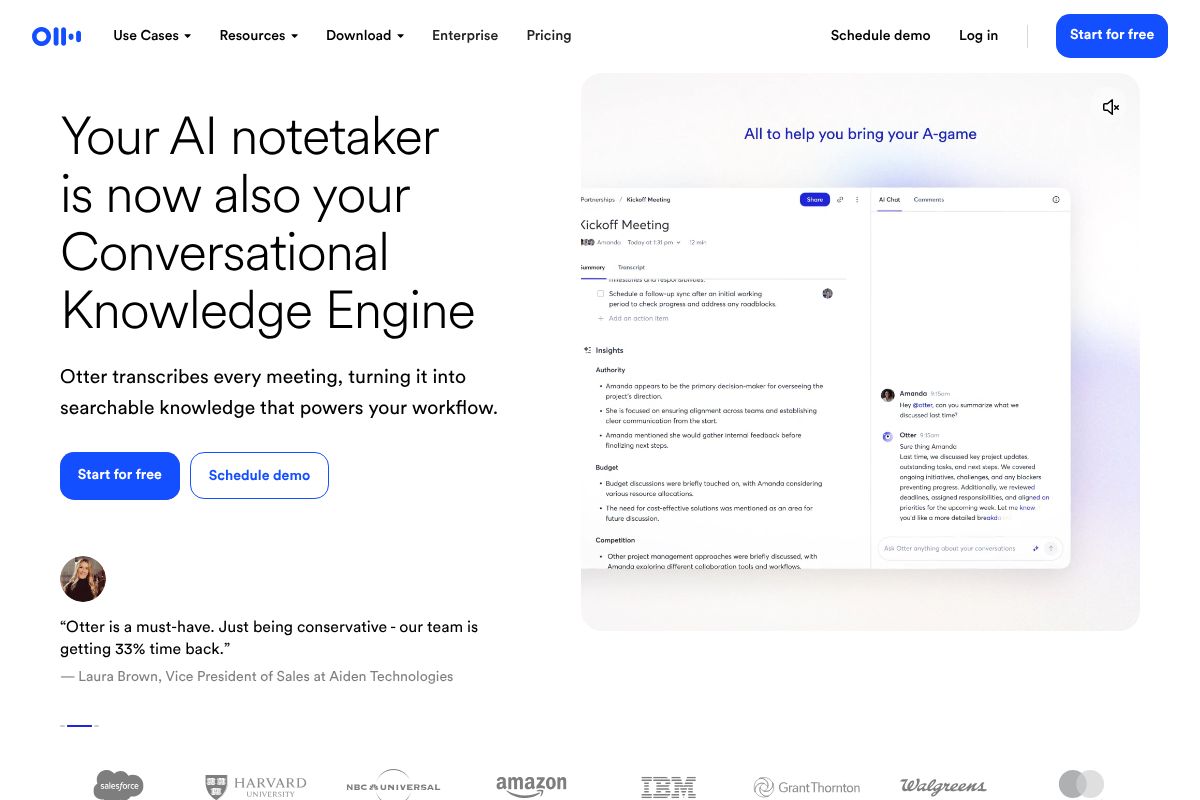
Otter.ai integrates directly with Zoom, Microsoft Teams, and Google Meet, so setup is straightforward. It automatically joins your scheduled calls, takes notes, and generates summaries without you having to remember to hit record. That alone is a game-changer if you’re jumping between meetings all day.
- Real-time transcription with speaker identification
- Searchable meeting history across all your calls
- Native integrations with Zoom, Teams, and Google Meet
- AI-generated summaries and action item detection
- Team sharing with comment and highlight features
The Pro plan runs $10/month on an annual plan, which is competitive for what you get. It’s particularly well-suited for professionals who spend a significant chunk of their week in meetings and need a reliable, low-maintenance solution they can trust.
Notion: Best for All-in-One Workspace with AI
If you’re looking for something that goes beyond transcription, Notion takes a different approach entirely. Rather than being a standalone meeting recorder, it’s a full team workspace — think docs, wikis, project tracking, and databases — with AI baked directly into the platform.
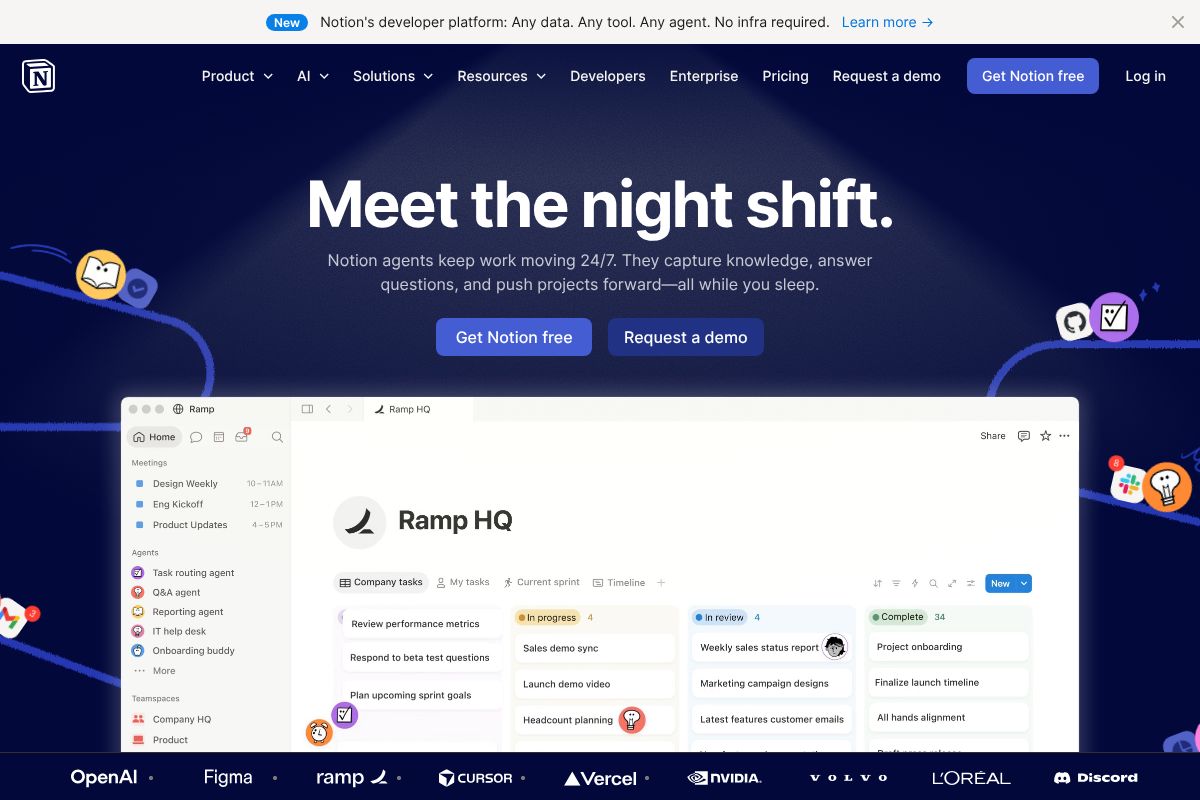
The Business plan at $20/user/month includes full AI access powered by GPT-4.1 and Claude, with no separate add-on fees. That means your meeting notes, action items, and follow-up tasks can all live in the same place where your team already does its work. Notion Agents can even help automate repetitive workflows, like turning meeting summaries into project tasks.
- AI included in the Business plan — no extra charge
- Centralized knowledge base for notes, docs, and projects
- Notion AI Agents for automated task creation and workflows
- 20% discount with annual billing
- Scales well for teams that want one tool instead of five
Notion isn’t a direct replacement for a transcription tool — you’d still need to paste or import your meeting notes. But if your bigger problem is that meeting insights get lost because they’re disconnected from your actual work, Notion solves that in a way Fireflies AI simply can’t.
Other Notable Alternatives
A couple of other tools are worth knowing about, depending on your specific needs.
Fathom has built a strong reputation for simplicity. It’s free for individual users, integrates with Zoom, and produces clean, concise summaries. It’s a great pick if you want something lightweight with minimal setup — though the free tier has limits, and team features require a paid plan.
Grain is a better fit for sales teams and content creators who want to clip and share specific moments from calls. It’s more visual than most transcription tools, letting you create highlight reels from customer conversations. The trade-off is that it’s more niche — if you’re not in sales or customer success, some of its standout features may not be relevant to you.
Both are solid options, but neither offers the same combination of depth and versatility as Otter.ai or Notion for most professional use cases.
Feature Comparison: Fireflies AI vs. the Alternatives
Choosing the right tool comes down to which features matter most to your workflow. Here’s how Fireflies AI stacks up against the main alternatives across the criteria that actually affect your day-to-day experience.
| Feature | Fireflies AI | Otter.ai | Notion | Fathom | Grain |
|---|---|---|---|---|---|
| Transcription Accuracy | Very good | Very good | Depends on import | Good | Good |
| Search Functionality | Strong (keyword + topic) | Strong | Strong (AI-powered) | Basic | Basic |
| Integrations | Extensive (CRM, Slack, etc.) | Good | Extensive | Zoom-focused | Moderate |
| Starting Price | Free / $18/mo paid | Free / $16.99/mo paid | Free / $10/user/mo | Free | Free / paid plans |
| Ease of Use | Easy | Easy | Moderate learning curve | Very easy | Easy |
| Team Collaboration | Good | Good | Excellent | Limited (free tier) | Good (sales focus) |
| AI Features | Strong (summaries, action items) | Strong | Excellent (GPT-4.1 + Claude) | Moderate | Moderate |
If transcription and meeting intelligence are your primary needs, Fireflies AI and Otter.ai are genuinely neck-and-neck. Fireflies has a slight edge in CRM integrations, which matters if you’re in sales. Otter.ai pulls ahead for teams who need real-time collaboration during live meetings.
Where Fireflies AI falls short is connecting meeting insights to your broader work. Notion wins here by a wide margin — your notes, action items, and project context all live in the same place, rather than in a siloed transcription app you have to check separately.
For simplicity and budget, Fathom is hard to beat — especially if you’re a solo professional on Zoom. And if your team is in sales or customer success, Grain’s visual highlight features offer something none of the others do.
The honest takeaway: Fireflies AI is still a strong product, particularly for integration-heavy workflows. But depending on your priorities, one of these alternatives is likely a better fit.
Pricing & Value Breakdown
Understanding what you’re actually paying per team member — and what you get at each tier — makes it much easier to choose the right tool. Here’s how the main contenders stack up.
Fireflies AI
- Free: Limited transcription minutes, basic summaries
- Pro: ~$18/user/month (billed monthly) or ~$10/user/month annually
- Business: ~$29/user/month monthly, or ~$19/user/month annually
Fireflies’ annual discount is meaningful — roughly 30–40% off depending on the plan. But you’re still paying per seat just for meeting transcription, which adds up quickly for larger teams.
Otter.ai
- Free: 300 monthly transcription minutes, limited AI features
- Pro: ~$16.99/user/month, or ~$8.33/user/month billed annually
- Business: ~$30/user/month, or ~$20/user/month annually
Otter.ai’s annual pricing is competitive, especially at the Pro tier. For a five-person team on annual Pro, you’re looking at roughly $500/year — a reasonable spend if transcription is your core need.
Notion
- Plus: $10/user/month (annual billing) for core workspace features
- Business: $20/user/month (annual) — includes full AI access with GPT-4.1 and Claude, plus Notion AI Agents
- AI is bundled into the Business plan — no separate add-on required
Notion’s Business plan at $20/user/month is where the real value shows. For the same per-seat cost as Fireflies’ Business tier, you get a complete workspace plus advanced AI capabilities built in. That’s a compelling deal if your team already needs project management, docs, and collaboration tools alongside meeting intelligence.
The quick math: if you’re paying separately for a transcription app and a project management tool, consolidating into Notion’s Business plan often costs less overall — while eliminating the friction of switching between apps.
Who Should Switch (And Who Shouldn’t)
Fireflies AI is genuinely good software. Before you jump ship, it’s worth being honest about who benefits from switching — and who’s better off staying put.
Stick with Fireflies if…
- You’re on a sales or recruiting team that lives inside CRM workflows — Fireflies’ native integrations with Salesforce and ATS platforms are hard to beat
- You need deep meeting analytics, like talk-time ratios and sentiment tracking, for coaching reps
- Your team holds high-volume external calls and needs a purpose-built tool rather than a general workspace
Consider Otter.ai if…
- Your primary need is fast, accurate transcription with minimal setup
- You’re a freelancer or solo creator who attends frequent meetings and wants clean notes without a steep learning curve
- You’re on a tight budget and the annual Pro plan’s lower per-seat cost matters more than advanced AI features
Consider Notion if…
- You’re already paying separately for project management and a transcription tool — consolidating saves money and reduces app-switching
- Your team wants AI woven into documents, wikis, and workflows, not just meeting notes
- You need Notion AI Agents to automate recurring tasks beyond the meeting room
The honest bottom line: Fireflies wins on meeting-specific depth. Otter.ai wins on simplicity and transcription focus. Notion wins when your team needs a broader AI-powered workspace and wants to stop paying for three separate tools.
How to Make the Switch Smoothly
Switching meeting tools sounds more disruptive than it actually is. Most alternatives covered here are designed to get you up and running in under an hour — and your existing data doesn’t have to disappear.
- Export your Fireflies data first. Head to your Fireflies account settings and download your transcripts and notes before canceling. Most platforms let you export as PDF or text files, so nothing gets lost in the transition.
- Test with one real meeting. Don’t roll out a new tool to your entire team on day one. Pick one internal meeting, run it through your chosen alternative, and compare the output quality to what you’re used to.
- Set up your integrations early. Whether it’s Slack, Google Calendar, or a CRM, connecting your tools before your first live meeting saves headaches. Most platforms walk you through this during onboarding.
- Give your team a five-minute walkthrough. A quick screen share showing where notes live and how to access them is all most people need. You don’t need formal training — just reduce the “where do I find it?” questions upfront.
The reality is that modern AI meeting tools are built for fast adoption. If something isn’t clicking within the first week, most offer free trials long enough to switch again without losing money.
Final Verdict: Which Alternative Is Right for You?
There’s no single “best” Fireflies AI alternative — the right choice depends entirely on how you work and what you’re trying to fix. Here’s a quick decision framework to help you land on the right tool.
- Choose Otter.ai if transcription accuracy and searchable meeting history are your top priorities. It’s purpose-built for capturing conversations and finding information fast — ideal for journalists, researchers, and anyone who lives in back-to-back meetings.
- Choose Notion if you want more than a meeting recorder. The Business plan at $20/user/month bundles full AI access — including GPT-4.1 and Claude — so your meeting notes, project docs, wikis, and workflows all live in one place. No extra add-ons, no tool-switching.
- Stay with Fireflies if you’re a sales or recruiting team that’s already embedded it into your CRM workflow and genuinely happy with the results. Switching for the sake of it rarely pays off.
The smartest move right now is to take advantage of free tiers before committing. Most of these tools offer enough functionality in their free versions to know within a week whether they’re a fit for your workflow.
Start with the tool that solves your biggest pain point, run it through a few real meetings, and let the results speak for themselves. Your future self — the one who isn’t digging through messy notes — will thank you.
Our Verdict
Editorial rating: 4.6/5
Strong alternatives exist, choose by priority
The Fireflies AI alternative landscape in 2026 offers genuinely competitive options across transcription quality, pricing, and features. While no single alternative dominates every category, most teams will find a better fit by prioritizing their specific needs—whether that’s cost savings, superior AI insights, or deeper integrations—though switching does require some initial setup time.
Frequently Asked Questions
Is there a free alternative to Fireflies AI?
Yes, several alternatives offer free tiers with basic transcription and note-taking features. Options like Otter.ai and Notta provide limited free plans, though premium features require paid subscriptions for advanced functionality.
What’s better than Fireflies for meeting transcription?
Top alternatives include Otter.ai for accuracy, Notta for affordability, and Fathom for AI-powered insights. The best choice depends on your specific needs around transcription quality, pricing, and integration requirements with existing tools.
Can I switch from Fireflies to another tool easily?
Most alternatives support direct imports of meeting recordings and transcripts, making migration straightforward. Most platforms offer onboarding assistance and don’t require extensive setup, allowing teams to transition within days rather than weeks.
Which Fireflies alternative has the lowest cost?
Notta and Otter.ai offer competitive pricing starting under $10 monthly for individual plans. However, enterprise pricing varies significantly, so comparing total cost of ownership across your team size ensures accurate budget planning.
Related Reads
- Best AI Tool for Note Taking in 2026: Top Picks
Find the best AI note-taking tool for your workflow. Compare top options, pricing, and features to boost productivity in…
- Best AI Tools for Remote Teams in 2026
Discover the top AI tools for remote teams in 2026. Boost productivity with AI-powered collaboration, transcription, and…
- Notion AI vs ClickUp AI: Which Wins in 2026?
Compare Notion AI vs ClickUp AI in 2026. See pricing, features, and which tool fits your workflow best.…