How many times have you walked out of a meeting, finished a brainstorming session, or listened to a podcast — only to realize your notes are a scattered mess of half-finished sentences and vague reminders? You’re not alone. Keeping up with information overload is one of the biggest productivity challenges for creators, marketers, and business owners today.
The good news is that the best AI tools for note-making in 2026 have completely changed the game. These tools don’t just store your thoughts — they organize, summarize, transcribe, and even connect ideas for you automatically. Whether you’re capturing meeting highlights, building a second brain, or just trying to stay on top of your research, there’s an AI-powered solution built for your workflow.
The right note-taking AI isn’t always the most famous one; it’s the one that matches how your brain actually works.
Key Takeaways
- AI note-making tools automate organization, transcription, and summarization, saving professionals hours weekly on documentation tasks.
- Top performers combine real-time transcription, intelligent tagging, and cross-platform sync for seamless workflow integration across devices.
- Pricing ranges from free basic plans to premium subscriptions at $15-30 monthly, depending on storage and AI features.
- Best tool selection depends on your primary use case: students benefit from summarization, professionals need collaboration features.
- Most AI note tools now include voice-to-text, smart search, and integration with calendars and productivity apps natively.
In This Article
Why AI Note-Making Tools Matter Now
Let’s be honest — traditional note-taking is broken. You scribble things down during a call, type fragments into a doc, or worse, trust yourself to remember the key points later. By the time you actually need that information, it’s buried in a notebook, lost in a folder, or simply gone. For busy freelancers, marketers, and creators juggling multiple projects, that kind of disorganization has a real cost.
The problem isn’t just losing notes — it’s the time you spend trying to take them in the first place. When you’re manually transcribing a client call or furiously typing during a brainstorm, you’re not fully present in the conversation. You miss nuances, lose context, and end up with notes that only make partial sense two days later.
AI note-making tools solve this at every stage of the process. Here’s what they actually do for you:
- Automatic transcription: Record a meeting or voice memo and get an accurate, searchable transcript in minutes — no typing required.
- Smart summarization: Instead of reading through pages of raw notes, AI pulls out the key takeaways, action items, and decisions automatically.
- Intelligent organization: Notes are tagged, categorized, and linked so you can actually find what you need when you need it.
- Seamless integration: The best tools connect with your existing workflow — Slack, Notion, Google Docs, CRMs — so nothing falls through the cracks.
For content creators building editorial calendars, marketers tracking campaign ideas, or freelancers managing client feedback, this isn’t just a convenience upgrade. It’s a genuine shift in how you capture and use information every day. The tools we’re covering in this guide make that shift surprisingly easy to adopt.
What Makes a Great AI Note-Making Tool?
Not every AI note-taking app is built the same way, and the “best” tool really depends on how you work. Before diving into specific recommendations, it’s worth thinking through what actually matters to you. A podcaster capturing interview ideas has different needs than a freelance consultant running back-to-back client calls — and the wrong tool can create more friction than it solves.
Here are the core criteria worth evaluating before you commit to anything:
- Transcription accuracy — especially with accents, industry jargon, or multiple speakers
- Organization and tagging — how easy is it to find something three weeks later?
- Search functionality — can you search by keyword, topic, or speaker?
- Integration with your existing tools — does it fit into your current workflow or require a full rebuild?
- Ease of use — will you actually use it consistently, or will it gather digital dust?
- Pricing — does the free tier cover your real needs, or is the useful stuff locked behind a premium plan?
- Privacy — who owns your data, and how is your audio or transcript stored?
Think of these as filters, not checkboxes. You don’t need a tool that scores perfectly on every point — you need one that scores well on your priorities.
Transcription & Capture Speed
The core promise of any AI note-making tool is turning spoken words into usable text — fast. But speed is only half the equation. If the transcript is riddled with errors, you’ll spend more time correcting it than you saved recording it in the first place.
Look for tools that handle real-world audio well: background noise, overlapping speakers, and domain-specific vocabulary. If you work in a technical field or frequently use industry terms, test the tool with your actual content before committing. A demo recording rarely reflects how messy real meetings get.
Organization & Searchability
Capturing notes is only useful if you can retrieve them later. This is where many tools fall short — they give you a transcript but leave you to organize it yourself.
The stronger tools use AI to automatically tag topics, identify action items, and even link related notes together over time. Robust search is non-negotiable: you should be able to search by keyword, date, speaker, or project without digging through folders manually. Ask yourself: if I need to find a specific client comment from six weeks ago, how long would that actually take? If the answer isn’t “seconds,” the tool isn’t working hard enough for you.
Integration & Workflow Fit
A note-taking tool that lives in isolation from everything else you use is a tool you’ll eventually stop using. The best options connect directly with the apps already in your workflow — think Google Calendar, Slack, Notion, HubSpot, or whatever CRM you rely on.
Consider where your notes need to end up, not just where they start. Do client call summaries need to flow into your project management tool? Should action items automatically appear in your task manager? The more seamlessly a tool fits into your existing setup, the less mental overhead it creates — and the more likely you are to actually trust it with your important information.
Top AI Note-Making Tools Compared
Before diving into the details, here’s a quick side-by-side look at how the leading AI note-making tools stack up. Use this as a starting point, then read the breakdowns below to find the right fit for your specific workflow.
| Tool | Best For | Transcription | Organization | Pricing | Free Tier |
|---|---|---|---|---|---|
| Notion | Teams & creators wanting one workspace | Limited (via integrations) | Excellent — databases, templates, AI | Free–$20/user/month | Yes |
| Otter.ai.ai | Meetings, interviews, podcasts | Excellent — real-time, speaker ID | Good — searchable transcripts | Free–$16.99/month | Yes |
| Fireflies.ai.ai | Sales teams & recruiters | Very good — auto-joins calls | Good — CRM-linked, searchable | Free–$18/month | Yes |
Notion: All-in-One Workspace with AI
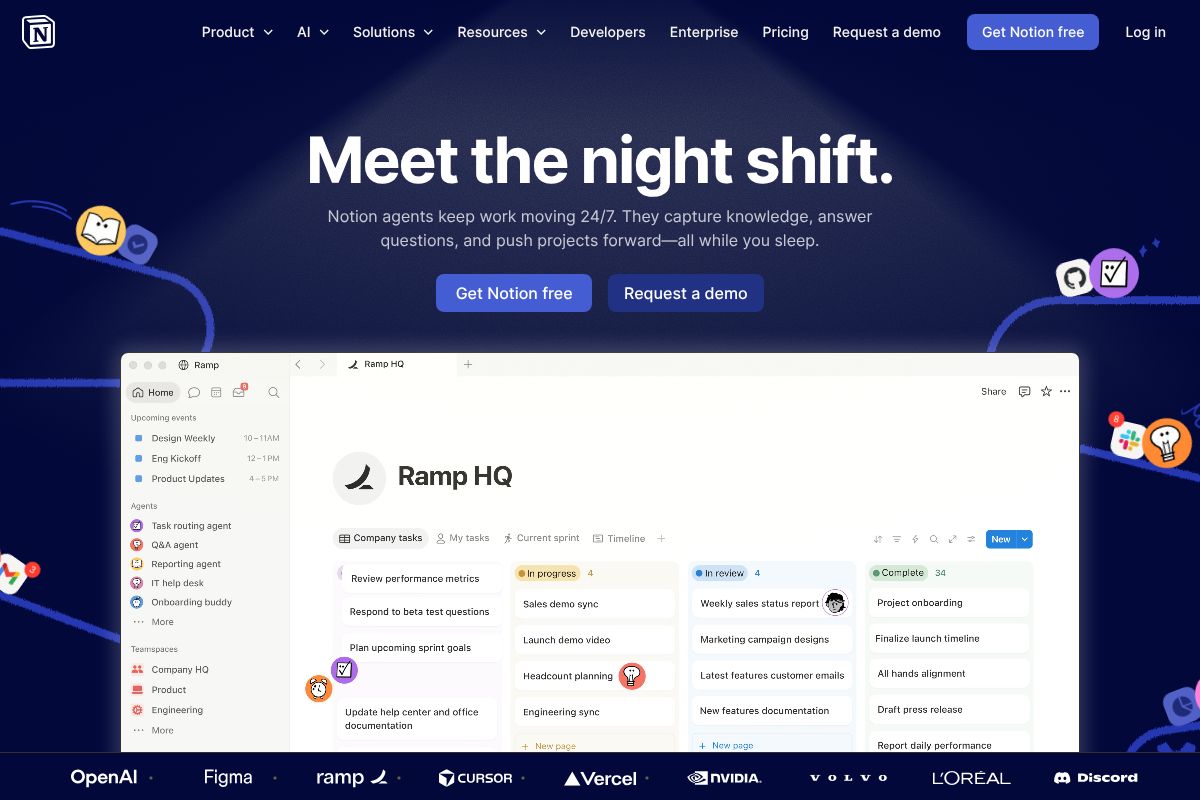
If you want a single place to capture, organize, and act on information — without juggling multiple apps — Notion is hard to beat. It’s particularly well-suited for teams and content creators who need more than just transcripts: think project wikis, content calendars, client databases, and meeting notes all living together in one workspace.
Notion’s AI features unlock fully on the Business plan at $20/user/month, where you get AI-assisted writing, auto-summarization, and smart search across your entire workspace. The free version is genuinely useful for individuals getting started, and the template library means you’re not building everything from scratch.
What makes Notion stand out is its flexibility — you can structure information exactly how your brain works, using databases, linked views, and custom properties. It also integrates cleanly with tools like Slack, Google Drive, and GitHub.
The honest trade-off: Notion has a real learning curve. If you just want to drop in and take notes without setting anything up, the initial configuration can feel overwhelming. It rewards the time you put in, but that investment isn’t trivial.
- Database-style organization with custom properties and filters
- Hundreds of community and official templates
- AI summaries, action item extraction, and writing assistance
- Integrates with most tools in your existing workflow
- Free tier available; Business plan at $20/user/month
Otter.ai: Meeting Transcription Specialist
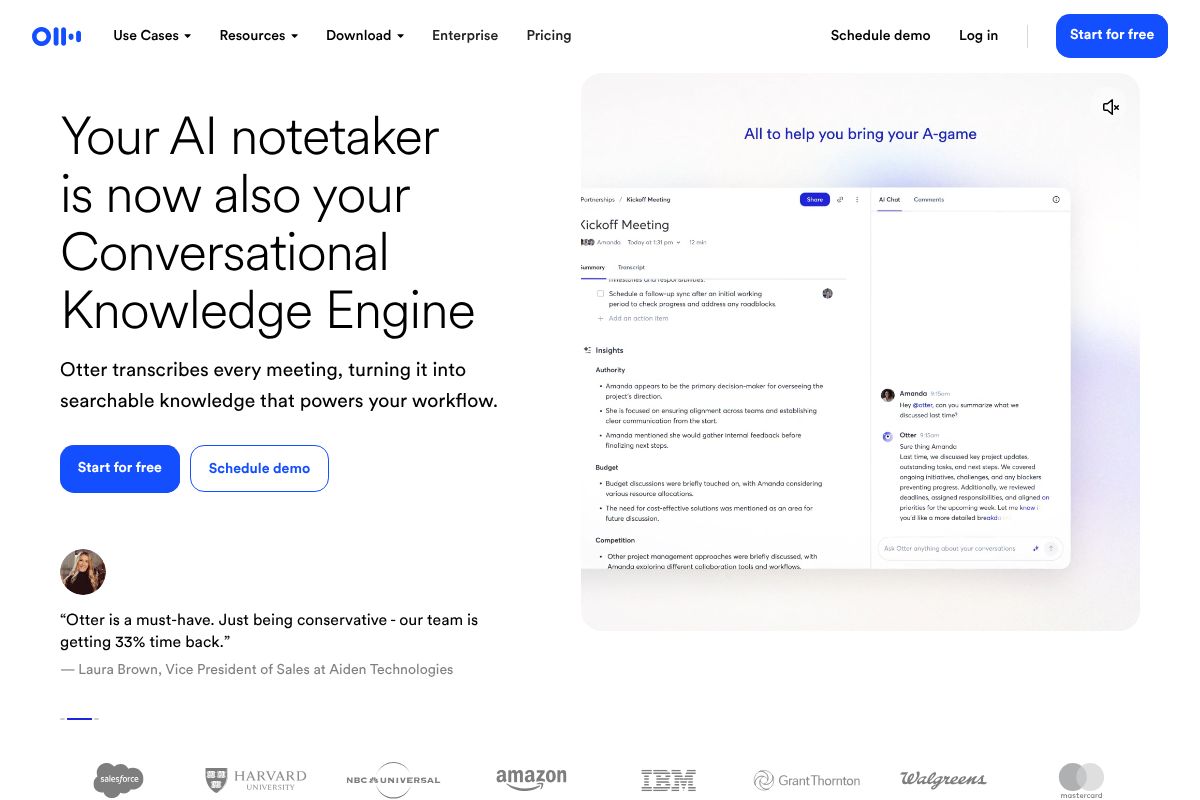
If your note-taking pain point is specifically meetings, interviews, or recorded conversations, Otter.ai is one of the most capable tools available. It transcribes in real time, identifies individual speakers, and makes every word searchable — so finding that specific client comment from last month takes seconds, not a manual scroll through a recording.
Pricing runs from a free plan up to $16.99/month, with the Pro plan available at $10/month on annual billing — solid value if meetings are a core part of your workday. The accuracy is genuinely impressive across a range of accents and environments, though noisy or overlapping-speaker situations can still trip it up.
Where Otter.ai earns its reputation is in the post-meeting workflow: automated summaries, highlighted action items, and shareable transcript links make follow-up faster for the whole team.
The key limitation to know upfront: Otter.ai is a specialist, not a generalist. It won’t replace a full workspace tool like Notion. If you need deep document organization, project management, or content creation alongside your transcripts, you’ll likely need to pair it with something else.
- Real-time transcription with speaker identification
- Automated meeting summaries and action item detection
- Fully searchable transcript archive
- Integrates with Zoom, Google Meet, and Microsoft Teams
- Free plan available; Pro at $10/month (annual)
Fireflies.ai: Sales & Recruitment Focus
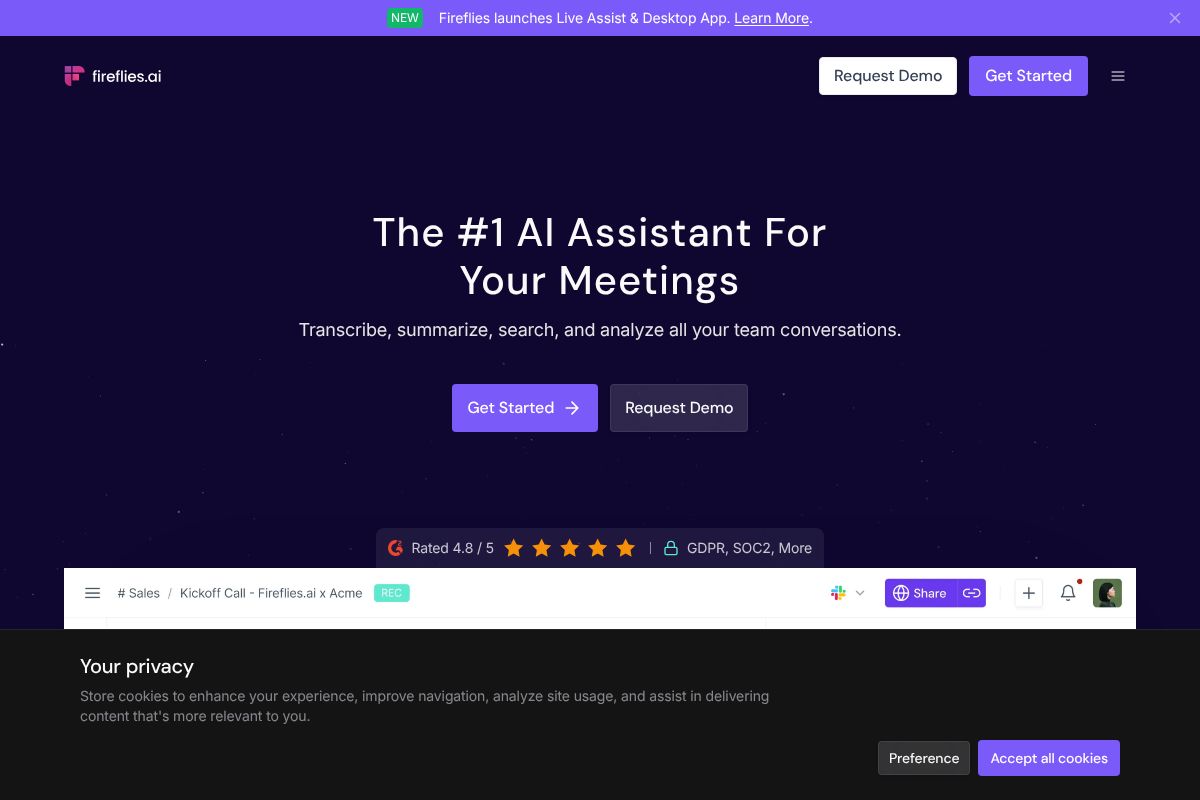
Fireflies.ai takes a more targeted approach than the other tools here — it’s built with sales teams, recruiters, and customer-facing professionals in mind. It automatically joins your calls, records and transcribes them, and then makes that conversation history searchable and actionable across your entire team.
The standout feature for sales and recruiting use cases is its CRM integration: call notes and summaries can flow directly into HubSpot, Salesforce, or similar platforms, cutting out a significant amount of manual data entry. Pricing starts free, with the Pro plan at $10/month on annual billing and plans up to $18/month for advanced features.
If your work revolves around client calls and pipeline management, Fireflies.ai genuinely earns its place. But if you’re a solo creator, writer, or general knowledge worker, the feature set may feel narrower than you need — and a more flexible tool would likely serve you better.
- Auto-joins and records calls across major platforms
- Searchable conversation history across your whole team
- Direct CRM integration (HubSpot, Salesforce, and more)
- AI-generated call summaries and topic tracking
- Free tier available; Pro at $10/month (annual)
Pros & Cons: What You Need to Know
Every tool in this guide has genuine strengths — but none of them is perfect. Before you commit to a subscription or build a workflow around any AI note-making app, it’s worth understanding the real limitations. What works beautifully for one person’s setup can be a genuine obstacle for another’s. Here’s an honest look at the trade-offs that matter most.
Transcription Accuracy & Edge Cases
AI transcription has come a long way, but it still stumbles in predictable situations. Strong accents, heavy background noise, overlapping speakers, and industry-specific jargon are all areas where accuracy drops noticeably — sometimes to the point where the transcript needs significant cleanup before it’s usable.
Technical fields are particularly vulnerable. Medical terminology, legal language, niche software names, and acronyms specific to your industry may be misheard or omitted entirely. Even the best tools in this space — Otter.ai, Fireflies.ai, and others — will occasionally produce errors that a human listener wouldn’t make.
The practical takeaway: treat AI-generated transcripts as a strong first draft, not a finished document. For anything client-facing or high-stakes, build in time for a quick human review pass. It’s still a significant time-saver — just not a fully hands-off one.
Privacy & Data Storage
This is the question most people forget to ask until it’s too late: where does your data actually go? When you record a client meeting or a sensitive internal discussion, that audio and transcript is being processed and stored on someone else’s servers. Most major tools offer encryption in transit and at rest, but the specifics vary considerably.
Some platforms use your data to improve their models by default — you may need to opt out manually. Others offer enterprise-tier data controls that aren’t available on lower plans. If you work with confidential client information, healthcare data, or anything legally sensitive, review the privacy policy carefully before you record a single meeting. A tool’s convenience is worth nothing if it creates a compliance problem.
Cost at Scale
Free tiers are a great way to test a tool, but they’re rarely viable for serious ongoing use. Most impose limits on monthly transcription minutes, storage, or the number of seats — and those limits tend to feel generous until your team actually starts relying on the tool daily.
A single user paying $10–$20 per month is easy to justify. But multiply that across a five- or ten-person team, and you’re looking at $600–$2,400 per year before you’ve unlocked advanced features. It adds up fast. Before committing, estimate your actual usage: how many hours of meetings per week, how many team members, and which features you genuinely need versus which ones just look good in the comparison table. The right tool is the one that delivers clear ROI for your specific volume — not the one with the longest feature list.
Pricing Breakdown: Free vs. Paid
Understanding what you actually get at each pricing tier helps you avoid paying for features you don’t need — or frustrating yourself with limits you didn’t see coming. Here’s how the most popular AI note-making tools stack up.
| Tool | Free Tier | Paid (Entry-Level) | Key Upgrade Benefit |
|---|---|---|---|
| Notion | Unlimited personal pages, basic AI limited | $10/user/month | Full AI access, unlimited file uploads, version history |
| Otter.ai | 300 minutes/month, 30-min meeting cap | $10/month (annual Pro) | 1,200 minutes/month, 90-min cap, advanced summaries |
| Fireflies.ai | 800 minutes storage, limited summaries | $10/month (annual Pro) | Unlimited storage, full transcripts, AI search |
When Free Is Enough
If you’re a solo user testing the waters, free tiers can carry you surprisingly far. Otter.ai’s free plan works fine for a handful of short weekly meetings. Notion’s free tier is genuinely powerful for personal note organization, even without full AI features unlocked.
When Paid Makes Sense
The moment you hit recurring limits — running out of transcription minutes, losing older notes, or needing to share with teammates — the paid tier pays for itself quickly. At $10/month, both Otter.ai and Fireflies.ai Pro are among the better-value upgrades in the productivity software space. You’re not paying for extras; you’re paying to remove friction from your daily workflow.
For teams using Notion, the per-seat pricing model means costs scale with headcount. A two-person team stays affordable; a ten-person team should evaluate whether a higher-tier plan with centralized admin controls justifies the jump.
Who Should Use Which Tool?
Not every AI note-taking tool is built for the same workflow. The best choice depends less on features and more on how you actually spend your day — whether that’s recording interviews, running client calls, or keeping a team aligned across projects. Here’s a straightforward breakdown by persona.
For Solo Creators & Freelancers
If your work revolves around interviews, podcasts, or research conversations, Otter.ai is your strongest option. It captures spoken content accurately and turns it into searchable, shareable transcripts with minimal setup. For everything else — drafting content ideas, managing client projects, organizing research — Notion gives you a flexible workspace that grows with your business. Many solo creators end up using both: Otter.ai for capturing and Notion for organizing.
- Podcasters & journalists: Otter.ai for fast, reliable transcription
- Writers & content strategists: Notion for idea management and long-form planning
For Small Teams & Agencies
When collaboration matters, Notion is hard to beat. It functions as a centralized knowledge base, project hub, and meeting notes repository all in one — meaning everyone on your team is working from the same source of truth. If your agency is client-facing and runs a high volume of sales or discovery calls, layering in Fireflies.ai adds serious value by automatically logging those conversations and surfacing action items without anyone needing to take manual notes.
- Creative agencies: Notion for internal wikis and client deliverables
- Client services teams: Fireflies.ai for call documentation and follow-ups
For Sales & Recruitment
Fireflies.ai is purpose-built for high-volume conversation workflows. Sales reps benefit from automatic call summaries, searchable transcripts, and direct CRM integrations that eliminate manual data entry after every prospect call. Recruiters get the same advantage — every candidate interview is logged, summarized, and searchable, making it easy to compare notes across a hiring panel without relying on memory or scattered documents.
- Sales teams: CRM sync and deal-stage tracking from call data
- Recruiters: Structured interview notes and cross-team visibility
Our Verdict: How to Choose
There’s no single “best” AI note-taking tool — the right choice depends entirely on how you work and what you need to get done. Rather than prescribing a winner, here’s a simple framework to help you land on the right fit.
- Start with your primary use case. Are you capturing meetings and calls? Brainstorming and building a personal knowledge base? Managing projects across a team? Or logging high-volume sales conversations? Your dominant workflow should drive the decision, not feature lists.
- Identify your non-negotiables. Think about transcription accuracy, the integrations you already rely on (Slack, CRM, Google Drive), and whether you’re buying for yourself or a team. A tool that doesn’t connect to your existing stack will create friction, not reduce it.
- Start with the free tier. Every major tool covered in this guide offers a free plan or trial. Use it for two to three weeks in real working conditions — not a demo environment. That’s the only way to know if it actually fits your rhythm.
- Scale when the ROI is obvious. Upgrading makes sense when you’re hitting limits that are costing you time or deals — not before. Let the tool prove its value first.
The best AI note-making tool is the one you’ll actually use consistently. Trust your workflow over the hype.
Get Started Today
The best way to find your ideal AI note-taking tool is simply to try a few. Most of the top options covered in this guide offer generous free tiers — no credit card required — so there’s very little risk in experimenting before you commit to anything.
Here’s where to start:
- Notion — Sign up for free and explore AI-assisted note-making, knowledge bases, and project organization all in one place.
- Otter.ai — Start with the free plan to transcribe up to 300 minutes of meetings per month and see how AI summaries fit into your workflow.
- Fireflies.ai — Try the free tier to automatically record, transcribe, and summarize your next few meetings with zero setup friction.
Our recommendation: pick two or three tools that match your primary use case and run them in parallel for a couple of weeks using real meetings and real work. You’ll know quickly which one clicks.
There’s no perfect tool on paper — only the one that works for your day. Start free, test honestly, and upgrade only when the value is obvious.
Our Verdict
Editorial rating: 4.6/5
AI note tools transform how you capture information
AI note-making tools deliver genuine productivity gains through automation and intelligent organization, making them essential for knowledge workers in 2026. The trade-off: most premium features require paid subscriptions, and accuracy depends heavily on audio quality and speaker clarity.
Frequently Asked Questions
What is the best free AI note-making tool?
Several tools offer robust free tiers, including Notion AI and Microsoft OneNote with basic transcription. Free versions typically limit monthly AI credits or storage capacity, making them ideal for light users testing features before upgrading.
Can AI note-making tools transcribe audio accurately?
Modern AI note tools achieve 95%+ accuracy for clear audio in English, with real-time transcription during meetings. Accuracy improves with speaker profiles and decreases in noisy environments; most tools allow manual corrections for critical details.
Do AI note-making tools work offline?
Most premium AI note tools require internet for transcription and AI features, though some allow offline note-taking with sync when reconnected. Check individual tool specifications, as offline capabilities vary significantly between platforms.
Which AI note tool integrates best with Slack and Teams?
Otter.ai and Microsoft OneNote lead integration capabilities with Slack and Teams, allowing direct note-sharing and meeting summaries. Integration depth varies by tool; verify native connectors versus third-party Zapier workarounds for your workflow.
Related Reads
- Notion AI Review 2026: Is It Worth It for Your Team?
Honest Notion AI review for 2026. See features, pricing, pros/cons, and how it compares to alternatives for creators and…
- Notion AI vs ClickUp AI: Which Wins in 2026?
Compare Notion AI vs ClickUp AI in 2026. See pricing, features, and which tool fits your workflow best.…
- Best AI Tools for Remote Teams in 2026
Discover the top AI tools for remote teams in 2026. Boost productivity with AI-powered collaboration, transcription, and…